
Blogs
 579
579 2
2
Welcome to the Blogs guide!
This section is named "Useful," and is dedicated to content that adds significant value to our platform's users. It's a space where you, as a Chef-level user, can wield the Blog Editor tool to create compelling and informative content.
With your Chef status, you have exclusive access to this feature, allowing you to craft engaging blog posts that enrich the experience of our community members. Your contributions in this section are bound to resonate with our audience and enhance their journey on our platform. So, dive into the Blogs section, unleash your creativity, and let your expertise shine. Your valuable content will not only enrich our platform but also leave a lasting impact on our community.
With your Chef status, you have exclusive access to this feature, allowing you to craft engaging blog posts that enrich the experience of our community members. Your contributions in this section are bound to resonate with our audience and enhance their journey on our platform. So, dive into the Blogs section, unleash your creativity, and let your expertise shine. Your valuable content will not only enrich our platform but also leave a lasting impact on our community.
Explore different parts of our blogs:
- recipes: process and tips for creating logos
- networking: discussion of useful topics
- trends: articles about design trends
- book reviews: articles about design-related books
- blacklist: articles about copyright infringement
- inspiration: articles that can be used for inspiration
- competitions and festivals: about competitions and festivals
- news: design news
- private: personal section where you can post logos collection and other design-related content not fitting into other sections
What is not allowed:
- Pure posts just containing only links to content on another platform (you can use LogoTwitter for this in the future)
- Content that may offend or stir controversy.
- Advertising posts (Allowed if exceptionally creatively designed)
How to use the blog editor
1. Click [Add blog] on the https://logobaker.pro/blogs/all page, select the proper part, and add a preview image, title, and description
2. Add main content (recommended to use the desktop device for editing)
3. Click [SAVE DRAFT]
You can check how the blog will look like
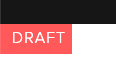
The draft status blog is visible only to the owner
4. If you need to update the draft click [Edit Blog] button at the bottom of the blog page
5. If all ok click [Publish blog] button
After that post will be "in moderation" state. Admin can edit blogs section if it was selected incorrectly. After that the blog will be released and available for all.
6. if the rules for creating a post were violated, the publication may be rejected
7. NOTE: After publishing you can't edit the blog, you can only delete
The status you can see in post preview or post page in top-left corner
Happy blogging!

Comments:
Open For all